AI Budget Build Gets a Parts Picker, Still Unpublished
AI Budget Build now lets you pick a machine and a budget and shows which graphics cards fit, what they cost and what they draw.
AI Budget Build is a website I am making for people who want to run AI models at home. Until now it was a plan and some research notes. On Wednesday it became something you can click: choose the computer you already own, set a budget, and it lists the used graphics cards that fit, what they would cost and what the build would cost to run each month. It is still on my machine only. Nothing is published and it earns no money.
The picker starts with a question, "What do you have?", with five starting points, including my own omarchy box and an old workstation. The budget buttons run from $500 to $10,000, and you can type your own. Each suggested build shows its total video memory, a price range and the catch, such as needing a new power supply or fan shroud. A running-cost box takes hours per day and price per kilowatt-hour. At four hours and $0.15, the build in the picture came to $27.20 a month, and the page says that is a ceiling, not an average.
It is a React and TypeScript app built with Vite, with the parts catalogue as JSON files for cards, power supplies and memory. The logic is plain functions with their own tests: budget, compatibility, running cost, currency, share links and an audit that checks the data. Share links, a copy-summary button and a CSV download are in. The commit also holds the design notes, the methodology page and 40 written-down user stories, which are guesses, not interviews.
What I did not verify: I did not run the test suite tonight, and prices are asking prices from listings that go stale. Shopping links are plain links because my affiliate accounts lapsed.
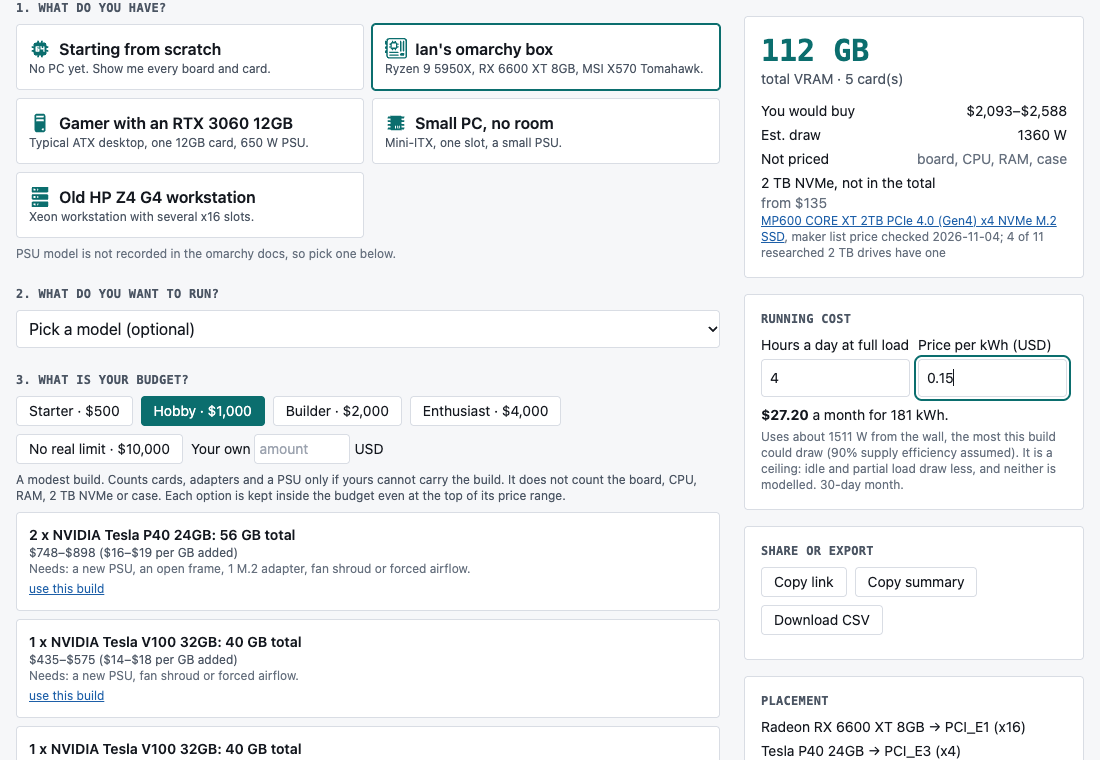
The parts picker on my own machine, captured on 4 November 2026, showing the running-cost box and share buttons.
Keep reading
AI Models Catalog Gets a Measured Benchmarks Page
My local AI model catalog now has a page of real speed measurements, each labelled as reading speed or writing speed with its source.
Comfy Golf Gets a Landing Page, a Guide and a Playable Demo
Comfy Golf now has a public website with a how-to-play guide and a demo you can try in the browser without installing anything.
Butcher Bay on Mac Runs Smooth, but Characters Stay Dark
The Mac port of the Xbox game now plays smoothly and packages as a real app, but the characters still render too dark.

