StatBar Ships Three Releases and Shows What Ate Your Disk
StatBar went from 1.7 to 1.10 in one day and can now show which folders grew most, how many days remain until the disk fills, and scan faster.
StatBar, my menu bar monitor for the Mac, now answers the question I actually ask when a disk fills up: what grew? Three releases shipped on Sunday, 1.8.0, 1.9.0 and 1.10.0. A map of your disk now shows which folders gained the most space in the last week, a line estimates how many days you have left before the disk is full, and scanning is several times faster. Sizes are also more honest than before.
The picture below is from the project's own screenshot harness, which uses sample folders rather than my real home directory.
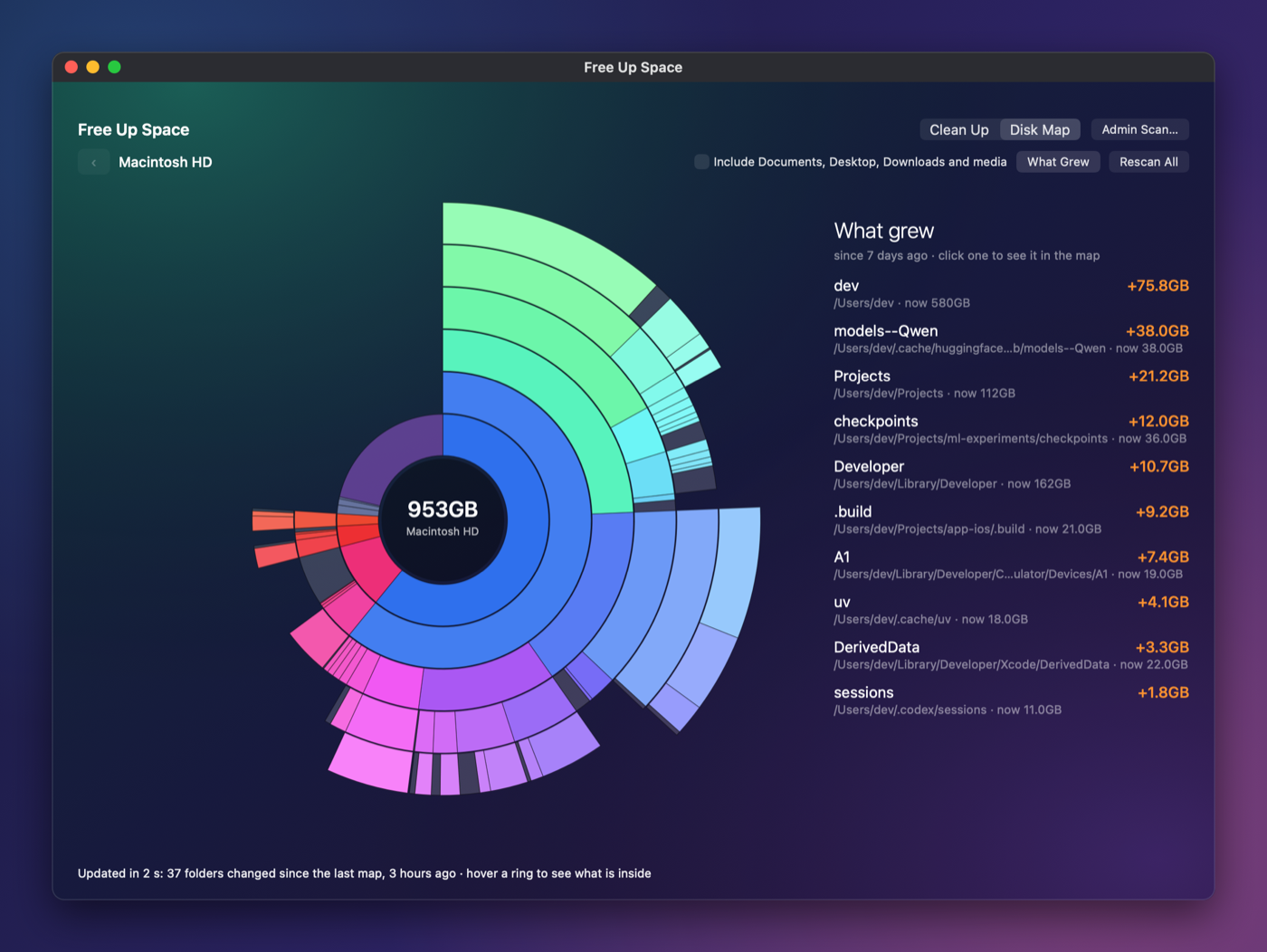 The Disk Map and its What Grew list in StatBar 1.10.0, from the screenshot harness with sample data, captured on 1 November.
1.8.0 added the Disk Map, a sunburst chart of everything on the disk, plus a Free… button on Review rows and an Admin Scan for folders that need administrator access. It also found Xcode when the usual command-line link was missing. 1.9.0 changed how sizes are counted, using the APFS private size, so cloned files stop being counted twice. It also added entry-by-entry cleaning, a clean report, saved scans that update as files change, and a StatBar-branded dialog for the Admin Scan.
1.10.0 holds the new features. What Grew keeps 30 days of daily history. A days-to-full estimate comes from hourly samples that survive restarts, with a line fitted after the last clean; it adds a menu warning under 7 days. The uv cache can be pruned, with sizes measured before and after. Simulator runtimes appear under Review, and a "Not Used in 90 Days" tick covers them and old simulators.
The speed fix is the one I like most. Nested concurrent loops had been running on a single thread, so the scans were never parallel. Moving the workers to the global queue and measuring all targets at once cut the list scan from 107 to 20 seconds and the map from 167 to 69 seconds, on my MacBook Pro only. The product site and guide got matching sections and new screenshots in the same day. I did not run the test suite tonight, and I did not rebuild the app to photograph it.
Keep reading
AI Models Catalog Gets a Measured Benchmarks Page
My local AI model catalog now has a page of real speed measurements, each labelled as reading speed or writing speed with its source.
Comfy Golf Gets a Landing Page, a Guide and a Playable Demo
Comfy Golf now has a public website with a how-to-play guide and a demo you can try in the browser without installing anything.
Butcher Bay on Mac Runs Smooth, but Characters Stay Dark
The Mac port of the Xbox game now plays smoothly and packages as a real app, but the characters still render too dark.

