SnapDog Gets a First Demo Film as Hermes Fleet Fails
SnapDog, my Mac screenshot app, now has a two-minute silent demo film for its website, while my house assistant failed its morning check again.
SnapDog, my Mac app for screenshots and screen recordings, now has a first complete demo film for its website. It is silent, runs just over two minutes and tells one story about three coworkers asking one person for help. The app did not change on Tuesday. The film is the news, and the machines in my house had a quieter, less happy day.
It was a quiet Tuesday by the numbers. The survey flagged three folders and I wrote up all three. One of them moved the product forward. The other two recorded that my assistants and my machines are mostly the way they were yesterday, which is its own kind of report.
SnapDog gets a silent film for its website
The film is a file I can play now. That is the whole change, and after weeks of storyboards it felt bigger than it sounds. The full cut runs 129.367 seconds. A companion trailer runs exactly 20. Both come from one script that renders 15 separate segments at 1920 by 1080 and 30 frames a second, then joins them without re-encoding. The detail is in the SnapDog entry for the day.
There is no sound, on purpose. A film that autoplays muted on a web page has to carry its meaning in the picture, so every caption is part of the frame. That constraint turned out to help. A caption that has to do the job of a voice-over gets short fast.
The story is a Friday at a made-up company called Fieldnote. Three coworkers each need something shown to them. One cannot find a setting. One wants to know if a button matches the design spec. One has hit an error that only appears after a click. The person who answers uses SnapDog to capture a region, mark it up with an arrow and a numbered step, record the failure, and find it again later through History search.
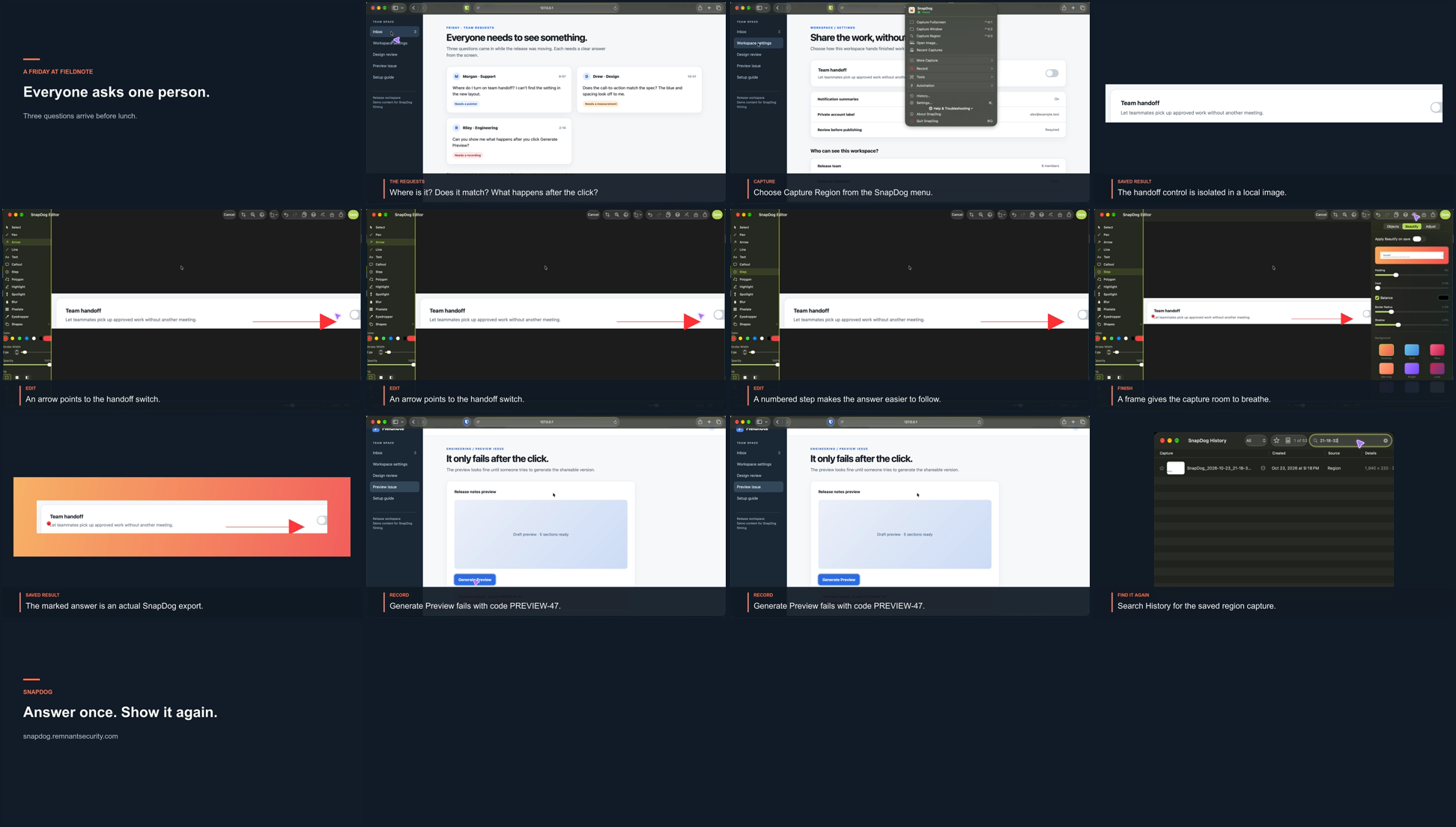
A contact sheet of the demo film, from a render I inspected on 24 October 2026, three days before the cut was written up. It shows the storyline in order and the closing card with the product's web address.
The 20-second trailer is the same story squeezed. It opens on "Everyone asks one person", runs through the three questions and ends on "Answer once. Show it again."
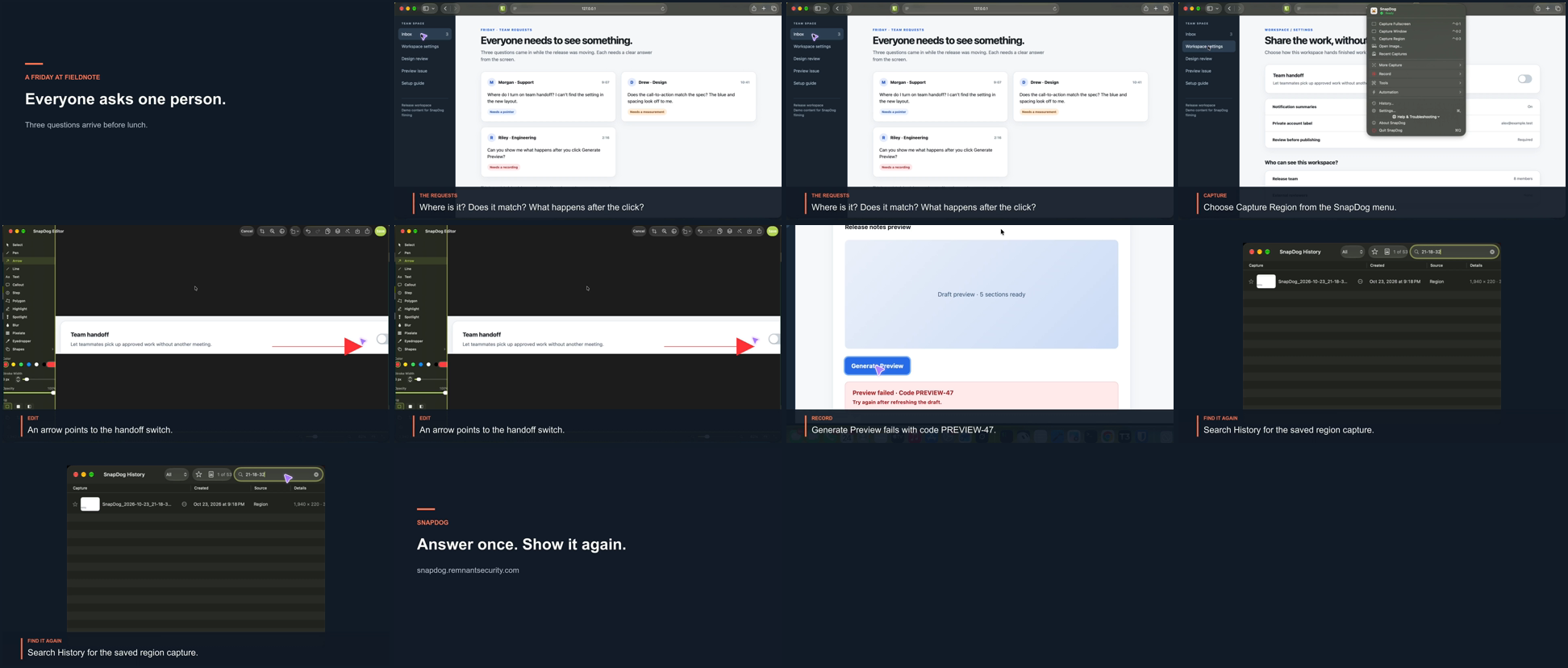
A contact sheet of the 20-second trailer, captured from a render on 24 October 2026. Each frame carries its own caption, which is the point of a film built to play with the sound off.
The mistake the inspection caught
I checked the duration and format with a video probe tool and looked at a contact sheet plus single frames at 30 and 106 seconds. The check found a real mistake. In the first render, a caption panel covered the error the recording was supposed to show. The whole third scene exists to show that error, so a caption sitting on top of it defeated the scene. I recropped the shot and looked at the 106-second frame again until both the error and the caption were readable.
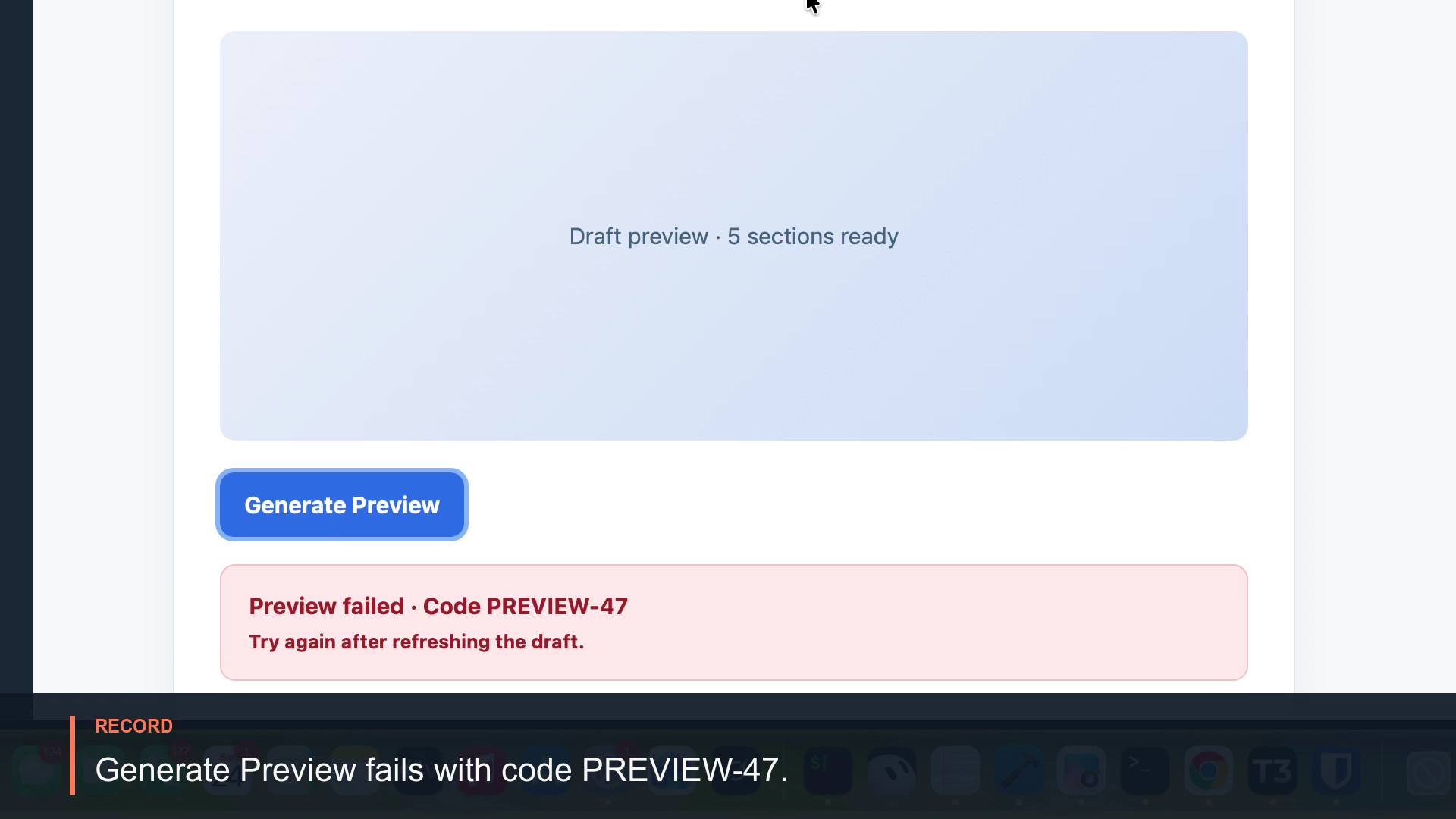
A single frame from the demo film's recording scene, from the render I checked on 24 October 2026. The failed preview and its error code sit in the picture with the caption below, which was the fix.
A note on that screenshot's date. The files I could use are the inspection frames from the 24th, not new captures from the 27th. The write-up says the final cut was rechecked after the recrop, and the frame above is the one saved at the end of that loop. I did not rerun the render tonight, so I cannot tell you the file on disk today is byte-for-byte the film those frames came from.
What the film does not prove
The project notes are strict about this and so am I. The film covers four things: region capture, an annotated screenshot, a saved screen recording and History search. Window capture, delayed capture, stitched capture, text recognition, camera, audio, sharing and watched folders have no accepted take yet, so none of them appears. Anyone who watches this film learns nothing about those features, and I would not want the site to imply otherwise.
Two more caveats from the notes:
- The editor footage is older than the recording fix from the 25th. The saved recording in the film does come from the rebuilt app.
- The picker overlay that shows when you drag out a region never reaches the screen recorder, so that moment is shown through its saved result instead.
I rejected one more thing while picking pictures for this story. A frame from the film's early scene showed a local test address and a made-up email address in the fixture page. They were fake, but a public page has no business showing either, so I left that frame out. SnapDog is on the App Store and has a public site, and the film is meant to live there. It has not been uploaded anywhere that I know of.
One small disagreement between records. The SnapDog entry says the film work landed as one commit at 23:09. The Grok Bot project scan counted two documentation commits on SnapDog for the same period. I did not reconcile them. My own look at the repository log shows several recent documentation commits, so the count depends on the window used.
Hermes Fleet fails its morning check for a fourth day
My house assistant's 08:00 health summary said FAIL: ollama unreachable again. That is the same verdict as on the 26th. The head-count of machines still cannot reach my laptop, which shows as a failed name lookup with every capability marked unavailable. Three of the five computers the assistant knows about answered. Two never did. The Hermes Fleet entry has the detail.
Nothing the assistant does is blocked outright. But a heavy job cannot be sent to a machine nobody can reach, and I would rather know that than assume it.
The number I keep watching is free space on the network storage box:
| Date | Free space | Total |
|---|---|---|
| 23 October | 3,855 MB | 7,685 MB |
| 26 October | 3,441 MB | 7,685 MB |
| 27 October | 3,285 MB | 7,685 MB |
That is about 570 MB gone in four days, on a box with 3,285 MB left. At that pace it is a weeks problem, not a days problem, and I have not done the arithmetic on anything fancier than that.
Two smaller items. The browser worker is still unbuilt, and nobody has watched the Telegram player in the flesh, so the unfinished list is the same as Sunday's. And the survey no longer lists two network ranges it listed on the 23rd. I do not know why, and I will not guess in public.
What I did and did not do: I read the inventory files, the diff and the summary. I did not log in to any machine, so I cannot say whether the laptop is asleep or gone. The changes in that folder are still uncommitted.
Grok Bot records eleven renamed assistants
On Monday afternoon the 26th, around 2:47 PM Central, eleven of my assistants got new display names. Each now reads as a name, a dot and a job title in the sidebar. Their roles did not change. The Grok Bot entry records that the notes caught up on Tuesday morning, after the 06:20 daily refresh compared the live profiles with the audit file saved on the 26th.
That comparison found 27 profiles, 26 active and one retired, with no new or removed assistants and no changed descriptions. The only change was the rename, and the title field was cleared in the same move. Because roles and lanes were untouched, the architecture diagram was not rebuilt. If you want the story of how the fleet got here, the 26th has the day two bots were added.
The refresh also added one row to the open-work list, taken from an audit by my Improve My Bots assistant. It concerns a sensitive item that one tracker exposes to every assistant. I am keeping the details off this public page on purpose.
The 05:36 scan of my projects folder called the day quiet: 213 top-level folders, 88 of them repositories, no new folders and no branch changes.
What did not work: the check that asks the tailnet who is online could not run on the box, and the laptop and the omarchy machine did not answer. I read the changelog and the open-work list. I did not open the individual assistant profiles myself.
What I would tell you
- Make the film before you make the feature list. Writing the film's story forced me to pick the four things SnapDog does that I can prove on camera. The list of what is not proven is now written down, which is more useful than it sounds.
- Look at every frame. The caption that covered the error was only found because I opened a frame at the right second. A probe tool told me the duration was right. It could not tell me the picture was wrong.
- A failing check you can live with is still a failing check. Four mornings of the same failure is a pattern. Either fix the laptop or change the check so that red means something again.
- Watch the slow numbers. The storage box is losing roughly 140 MB a day. Nothing is broken today.
I did not build, upload or publish anything for this story. The images above are inspection frames from earlier renders, and I say so in each caption.
Sources
- SnapDog: Capture, Record and Annotate from your Mac's menu bar, the product's public site, opened on 28 October 2026 to confirm it is live.
- SnapDog: Capture & Annotate on the App Store, the public listing, opened the same day. I read the page title only.
- The day's own records: the SnapDog, Hermes Fleet and Grok Bot entries, plus the SnapDog project's production notes and the film's saved inspection frames.
Keep reading
Butcher Bay Mac Port Hits 60 fps, Comfy Golf Gets a Site
The Mac port of Escape from Butcher Bay now plays smoothly but draws characters too dark, while Comfy Golf and my AI models catalog gained new pages.
Quiet Links Golf Gets a Swing as Dante Recomp Speeds Up
On Friday my browser golf game Quiet Links gained a three-press swing and a caddie, while three Mac game conversions each moved a little.
Dante Recomp Host Plays on My Mac as GoW3 Recomp Hangs
A converted PlayStation 3 game reached real gameplay on my Mac while a second, God of War III, drew a splash screen and froze.