AI Budget Build Gets a Parts Picker, OS Pi Audio Stays Broken
AI Budget Build became a clickable graphics card picker, OS Pi spent a day measuring Monkey Island audio it still plays wrong, and SnapDog got studio checks.
AI Budget Build became a page you can click on Wednesday: pick the computer you own, set a budget, and it lists the used graphics cards that fit, their cost and power draw. It is on my machine only. The day's other stories were less tidy: OS Pi still plays old game music wrong, and SnapDog got checks I could not run.
Three projects had real work. One of them ended with a result I can show you, one ended with a number that looks fine and a sound that does not, and one ended with code that is written and unproven. I will take them in that order.
AI Budget Build: a picker you can click
AI Budget Build is a website for people who want to run AI models at home without buying the wrong hardware. Until Wednesday it was a plan and a lot of notes. Now it opens on one question, "What do you have?", with five starting points. One of them is my own omarchy box, which has a Radeon RX 6600 XT with 8 GB of video memory. The others include an old workstation.
You then pick a budget. The buttons run from $500 to $10,000, and you can type your own number. The page lists cards that fit, with the catch written next to each one. The Tesla P40, the cheapest per gigabyte at $10 to $13, is old Pascal silicon with no tensor cores, needs forced airflow and an adapter cable. The Instinct MI50 has fast memory, but official support was dropped upstream, so you build the software yourself. I like that the catch is on the card, not on a separate page nobody reads.
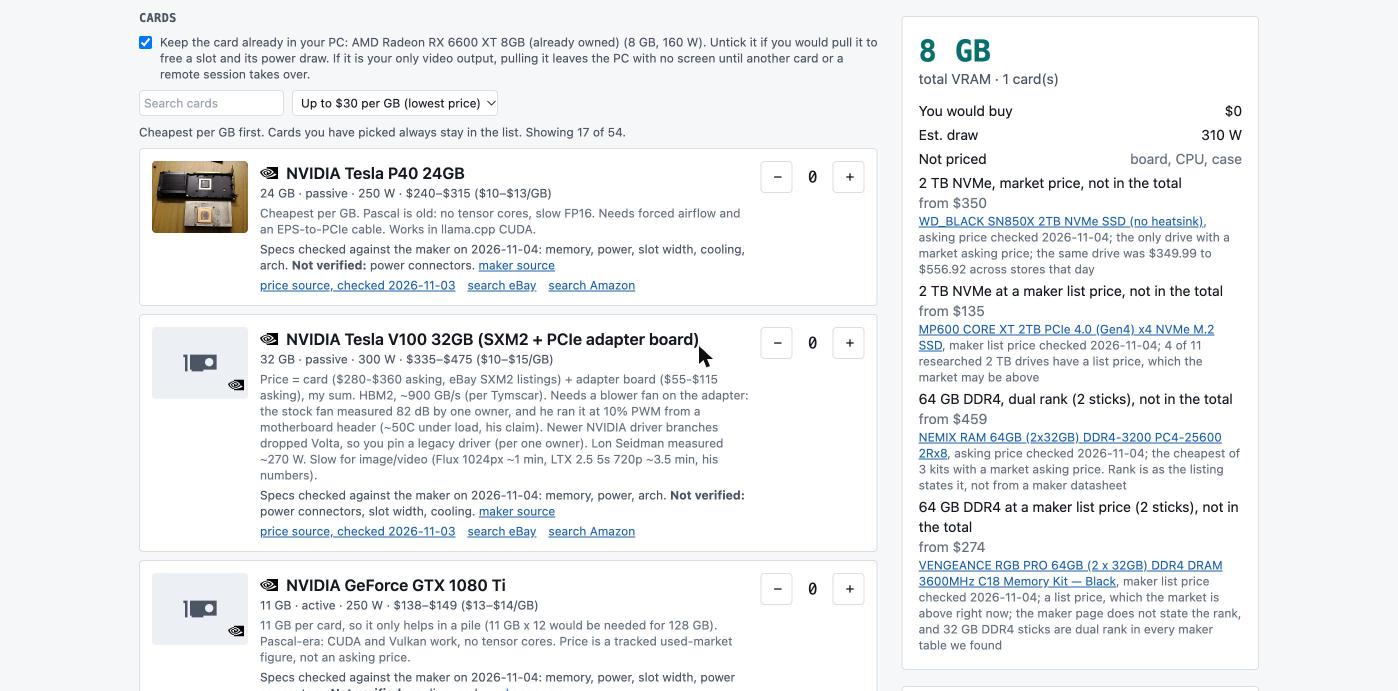
The card list on my own machine, captured on 4 November 2026, filtered to "up to $30 per GB". It shows 17 of 54 cards. Look at the V100 entry: the price is my own sum of a card and an adapter board, and the page says so.
The running-cost box is the part I would use first. You give it hours per day and the price per kilowatt-hour. At four hours a day and $0.15, the build in the entry's picture came to $27.20 a month. The page calls that a ceiling, not an average, because a card does not draw its full rated power all day.
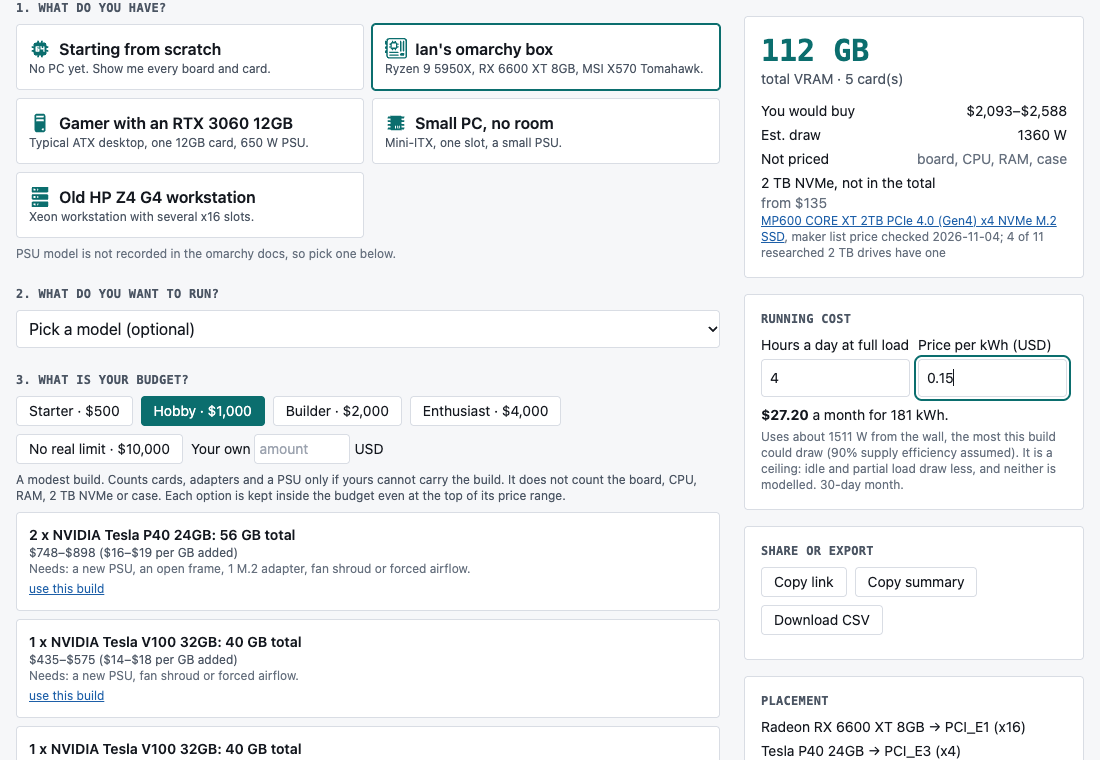
The picker on 4 November 2026, with the running-cost box and the share buttons. The $27.20 is the result for four hours a day at 15 cents.
What sits behind it
It is a React and TypeScript app built with Vite. The parts catalogue is plain JSON for cards, power supplies and memory. The logic lives in small functions with their own tests: budget, compatibility, running cost, currency, share links, and an audit that checks the data. Share links, a copy-summary button and a CSV download are in. The same commit holds the design notes, a methodology page and 40 written-down user stories. Those stories are my guesses about who will use the site. They are not interviews, and I will not pretend otherwise.
The model pages
The project folder also holds screenshots of two pages the entry does not describe, so I will keep this to what the pictures show. One is a "What can I run?" page, where you enter GPU memory and system RAM and it tells you which mixture-of-experts models fit. With 8 GB of GPU memory and 192 GB of RAM at 4-bit, it said 21 of the 33 listed models fit in some form, and the biggest was a 300-billion-parameter model at about 180 GB. The page is careful to say it checks memory fit only. Speed is not measured.
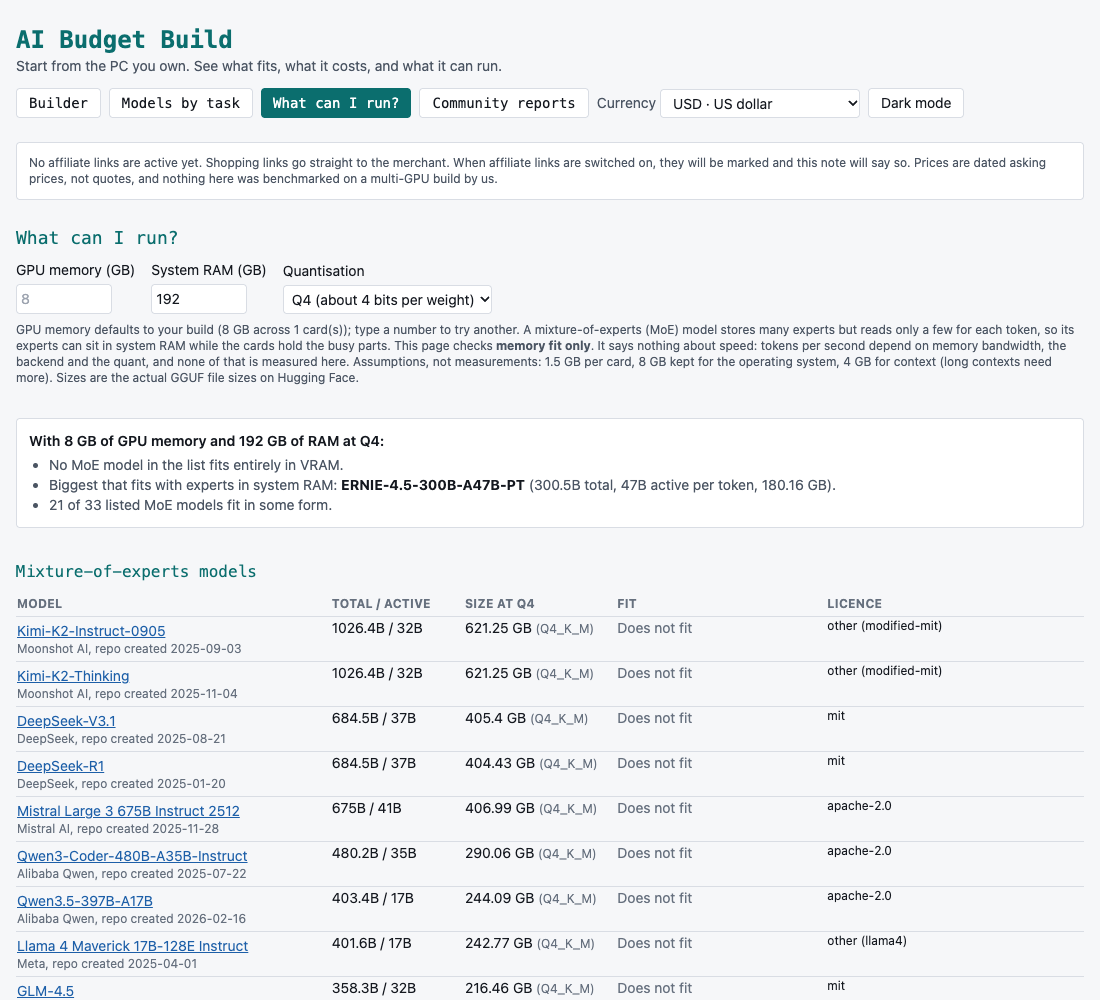
The "What can I run?" page, captured on 4 November 2026. The summary text above the table says 21 of 33 models fit; the page states that it says nothing about tokens per second.
The other is a Community reports page. It keeps other people's measurements apart from the parts and prices the site is built on, and the page says none of them were reproduced here. I think that split is the right call. A benchmark from one stranger's machine should not sit next to a price I checked.
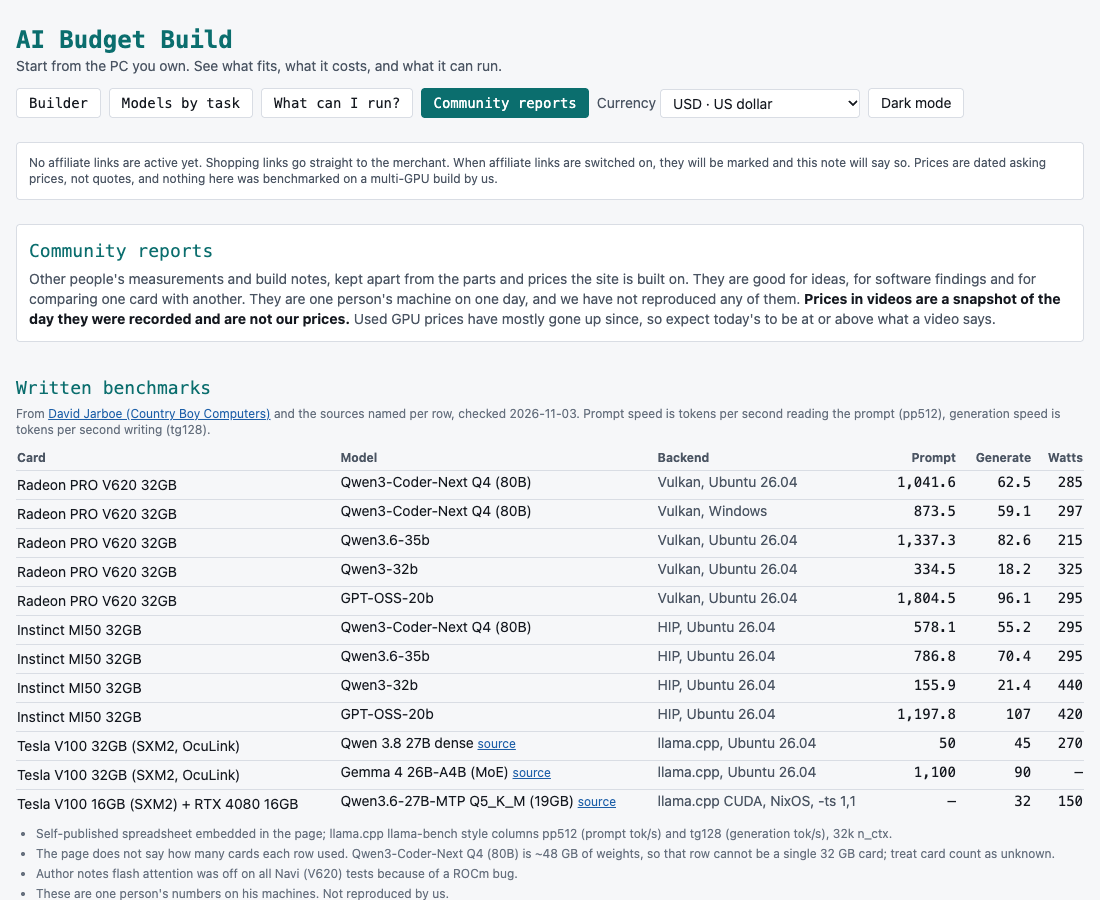
The Community reports page, captured on 4 November 2026. The table is other people's numbers, checked on 3 November, and the page warns they are one machine on one day.
What I did not verify
I did not run the test suite on Wednesday night. Prices are asking prices from listings, and they go stale. The shopping links are plain links because my affiliate accounts lapsed, and the page says no affiliate links are active. Nothing is published and nothing earns money.
OS Pi: 23 commits and the notes still sound doubled
OS Pi is my own classic-Mac-style desktop. On Wednesday I tried to get Monkey Island to play its opening music properly. I did not manage it. For roughly the first 20 seconds in the SCUMM Bar, every note sounds as if it is played twice. Then it settles and sounds mostly fine.
The numbers say the audio is healthy, and my ears disagree. I trust my ears.
The work was 23 commits, nearly all of them measurement. The runtime now paces itself at the speed of the old 68020 chip, about 16 MHz, instead of tying itself to screen refresh. Audio flows through a small buffer that the sound card reads from.
| Measurement | Result after startup |
|---|---|
| Frames per second | 60 |
| Audio frames per second | about 48,000 |
| Underruns | 0 |
| Clipped samples | 0 |
| Note events in the first 20 seconds | 26 |
| Repeated notes within 250 ms | 0 |
Startup is the exception. One run had a 754 millisecond scheduling gap, 7 frames a second and 34,304 frames of silence. Later intervals recovered.
That last row matters most. If the game were sending each note twice, the log would show repeats, and it shows none. So the doubling is not coming from the game's note stream. I also stopped a stray second copy of the runtime that had been left running, in case it caused the problem. The doubling stayed. Those are leads, not a cause.
Here is what I did not verify. I never captured the rendered sound, only counters and my own listening, so "doubled" is one person's ear. Double-clicking the game from the OS Pi desktop was not shown to work, because the automation tool could not click the Applications folder. I will not call that a real failure. The sequel's manual-lookup screen is still blocked. The full C test suite passed earlier on this checkout, but I did not rerun it Wednesday night.
I have no screenshot of this one. A picture of a silent window would prove nothing.
SnapDog: the studio learns to wait
SnapDog is my Mac capture and annotate app, and its reel-making studio got two changes aimed at demo videos that used to fail quietly. You can read the Linux rebuild from Tuesday for where the packages stand. I did not touch them Wednesday.
The first commit added two Simulator tools: wait-for-boot and open-URL. Waiting matters because a recording that starts on a half-booted simulator captures a black screen. The same commit made Loom link matching case-insensitive on the Mac side, which the Linux side already had. It added a 149-line test file.
The second commit made the studio validator warn when an app preview is in the wrong format, or when the combined clips fall outside 15 to 30 seconds. That is the length I wrote down as Apple's limit. I opened Apple's app preview specifications page, but my fetch did not return the length figure in readable text, so I have not re-confirmed it today. The commit is 52 lines of validator and 69 lines of tests. They are warnings, not blocks, so you can still export.
No Mac tests ran. Both changes are written, not proven, and none of it is in a released build.
SnapDog also has a rule I have to respect when picking pictures. The catalogue of publishable art marks its old store screenshots as rejected, so I left them alone and used no SnapDog image today.
What was left out
Several folders changed but I did not write them up. TilePilot, the BookForge pipeline, Civic Fortune 2026 and barfly only gained generated sales ad copy files. Pipe Flow, Prism Shift, gamevalidator, build_orchestration and a few others changed in scratch art, logs or uncommitted work I did not examine in time. Two folders are marked do not promote, and one holds unpublished manuscript material. The day overview names each one.
What I would tell you
If you are shopping for used GPUs, the useful habit in the picker is the one it forces: read the catch before the price. A $10-per-gigabyte card that needs a custom fan shroud and an adapter cable is not the same purchase as the number suggests.
If you are debugging audio, do not let healthy counters talk you out of what you hear. Zero underruns and zero clipping told me the pipeline was moving samples. They told me nothing about whether the samples were right. I need to capture the rendered sound before I can say anything stronger.
And if you write checks for something like an app preview, remember that a check that never ran is a guess. I have two SnapDog changes and no test result. Tomorrow's first job is to run them.
Sources
- SnapDog public site, opened 5 November 2026 to confirm the product page is live.
- SnapDog on the Mac App Store, opened 5 November 2026; the listing loaded, and I did not check its contents beyond the title.
- App preview specifications, Apple Developer, opened 5 November 2026; I did not confirm the 15 to 30 second figure in the text my fetch returned.
- Project entries for the day: AI Budget Build, OS Pi and SnapDog.
Keep reading
Butcher Bay Mac Port Hits 60 fps, Comfy Golf Gets a Site
The Mac port of Escape from Butcher Bay now plays smoothly but draws characters too dark, while Comfy Golf and my AI models catalog gained new pages.
Quiet Links Golf Gets a Swing as Dante Recomp Speeds Up
On Friday my browser golf game Quiet Links gained a three-press swing and a caddie, while three Mac game conversions each moved a little.
Dante Recomp Host Plays on My Mac as GoW3 Recomp Hangs
A converted PlayStation 3 game reached real gameplay on my Mac while a second, God of War III, drew a splash screen and froze.